

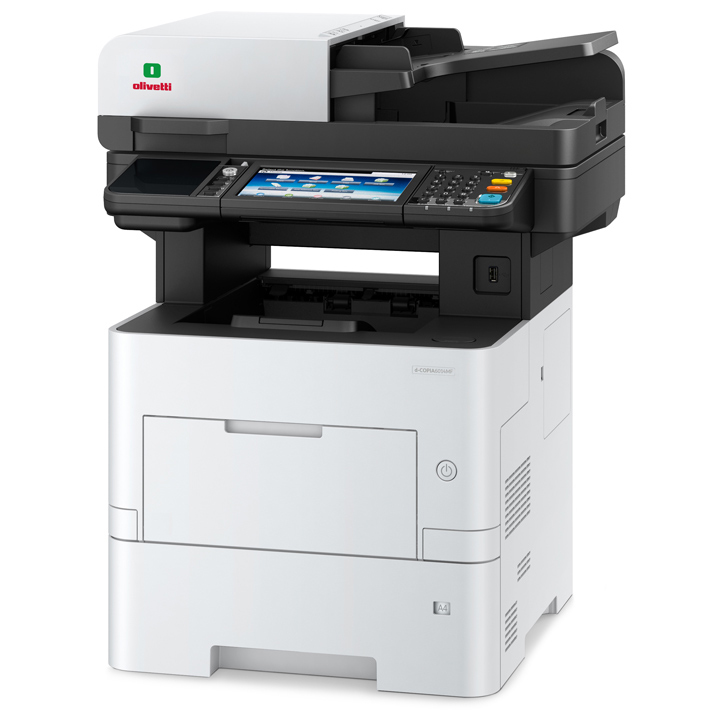
The Olivetti d-Copia 4513MF Plus copier offers the following features:
- Copy, Print, Scan & Fax
- Up to 45 ppm – A4 – B/W
- Paper Capacity up to 2.600 Sheets(with additional Drawers)
- Resolution 1.200 x 1.200 dpi ,600 x 600 dpi (scan/copy)
- Dual-scanner for 45 ppm models
- Network & USB Interface
- 7″ Colour Touch Screen,
- First Print out Time 5.9 Secs
The Olivetti d-Copia 4513MF Plus copier consumables:
Toner Cartridge Black up to 14.500 A4 pages.
Overview of the Olivetti 4513MF Plus A4 Copier
The Olivetti 4513MF Plus A4 Copier is a versatile and efficient multifunctional device designed to meet the demanding needs of modern offices, small businesses, and home offices alike. With its sleek design and advanced features, this copier offers a comprehensive solution for printing, scanning, and copying tasks.
Introduction to Olivetti 4513MF Plus A4 Copier
The Olivetti 4513MF Plus A4 Copier is a compact yet powerful machine that delivers exceptional performance in a variety of printing environments. Whether you need to print high-quality documents, scan important papers, or make copies of important documents, this copier is up to the task.
Key Features of Olivetti 4513MF Plus A4 Copier
High-Speed Printing
One of the standout features of the Olivetti 4513MF Plus A4 Copier is its high-speed printing capabilities. With a printing speed of up to 45 pages per minute, you can quickly and efficiently produce documents without sacrificing quality.
Versatile Paper Handling
This copier offers versatile paper handling capabilities, allowing you to print on a wide range of media types and sizes. Whether you need to print on standard letter-size paper or specialized materials, the Olivetti 4513MF Plus A4 Copier can handle the job with ease.
Advanced Scanning Capabilities
In addition to its printing and copying functions, the Olivetti 4513MF Plus A4 Copier also boasts advanced scanning capabilities. With its integrated document feeder and high-resolution scanning technology, you can quickly digitize your documents for easy storage and sharing.
User-Friendly Interface
The Olivetti 4513MF Plus A4 Copier features a user-friendly interface that makes it easy to navigate and operate. With its intuitive controls and clear display, you can easily access all of the copier’s features and settings.
Benefits of Using Olivetti 4513MF Plus A4 Copier
Increased Productivity
By streamlining your printing, scanning, and copying tasks, the Olivetti 4513MF Plus A4 Copier can help increase productivity in your office or business. With its fast printing speeds and efficient operation, you can get more done in less time.
Cost Efficiency
With its low operating costs and energy-saving features, the Olivetti 4513MF Plus A4 Copier offers excellent value for money. By reducing your printing and energy expenses, this copier can help save your business money in the long run.
Superior Quality Output
Whether you’re printing documents, scanning photos, or making copies, the Olivetti 4513MF Plus A4 Copier delivers superior quality output every time. With its advanced printing and scanning technology, you can expect crisp, clear results with every use.
Applications of Olivetti 4513MF Plus A4 Copier
Office Use
The Olivetti 4513MF Plus A4 Copier is ideal for use in busy office environments where high-volume printing and scanning are required. With its robust construction and reliable performance, this copier can handle the demands of any office setting.
Small Businesses
Small businesses can benefit from the Olivetti 4513MF Plus A4 Copier’s versatile features and cost-effective operation. Whether you’re printing invoices, scanning receipts, or making copies of important documents, this copier is a valuable asset to any small business.
Home Offices
Even in a home office setting, the Olivetti 4513MF Plus A4 Copier shines. Its compact size and quiet operation make it perfect for use in a home office environment, where space and noise levels may be a concern.
Comparison with Other Copiers
When compared to other copiers on the market, the Olivetti 4513MF Plus A4 Copier stands out for its combination of performance, features, and value. With its fast printing speeds, advanced scanning capabilities, and user-friendly interface, it offers a superior solution for all your printing needs.
Maintenance and Support
Olivetti offers comprehensive maintenance and support services for the 4513MF Plus A4 Copier, ensuring that your device remains in top condition and minimizing downtime. With prompt service and expert technical support, you can rely on Olivetti to keep your copier running smoothly.
Conclusion
In conclusion, the Olivetti 4513MF Plus A4 Copier is a versatile and reliable multifunctional device that delivers exceptional performance in any printing environment. With its advanced features, cost-effective operation, and superior quality output, it’s the perfect solution for offices, small businesses, and home offices alike.
FAQs
- Does the Olivetti 4513MF Plus A4 Copier support wireless printing?
- Yes, the Olivetti 4513MF Plus A4 Copier supports wireless printing, allowing you to print from your computer, smartphone, or tablet.
- What is the maximum paper capacity of the copier’s input tray?
- The copier’s input tray can hold up to 550 sheets of paper, reducing the need for frequent refills during high-volume printing tasks.
- Can I scan double-sided documents with the Olivetti 4513MF Plus A4 Copier?
- Yes, the copier’s automatic document feeder supports duplex scanning, allowing you to scan both sides of a document simultaneously.
- Does the copier offer any security features to protect sensitive documents?
- Yes, the Olivetti 4513MF Plus A4 Copier offers a range of security features, including user authentication and encrypted printing, to protect your sensitive documents from unauthorized access.
- Is the copier compatible with third-party printing software?
- Yes, the Olivetti 4513MF Plus A4 Copier is compatible with a wide range of third-party printing software, allowing you to integrate it seamlessly into your existing workflow.
